Fire Stick Installation
- At your Fire Stick home menu navigate to settings
 . Navigate and select My Fire TV.
 - Select Developer Options
- Select Allow Apps from unknown sources, and choose turn on.
- Navigate back to Fire Stick home menu.
- From the home menu navigate and select apps
 .
. - Search for a App named downloader
 . Once located install downloader onto your Fire Stick.
 - Once installed open the Downloader App. The App will ask for permission to access your Fire Stick files. Click allow.
- Navigate to the address bar section of the App
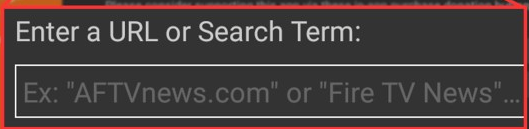 .
. - Click on the bar and a keyboard will appear, type the number 672779.
- Click on GO. You will be directed to the site where the WWTV App is stored. In about ten seconds the Fire Stick will start downloading the App.
- After the App has been downloaded a window will appear asking to install the App, select Install.
- After the App has been installed push the home button on your remote.
- At the Fire Stick home menu, navigate to apps again, scroll to the bottom of the page and look for the WWTV app. You may need to select the app library to locate the WWTV app
 and then press select.
 - A screen will appear and ask if this App is being installed on a TV or Mobile Devices, Select TV.
- Next is the login screen enter in the username and password you were supplied. Then select login.
- Select to download Live TV, then Movies, and finally Series. Congratulations!! Your app is installed, now you can explore the app by selecting the service you would like to start with.
Tips
In the WWTV app to save favorites in live TV, navigate to the channel that you would like to make your favorite and press & hold the select button, a little window will appear select add to favorites and it will be added to your favorite list. To add to favorites in the Movies and Series simply select a movie or series you would like to save as a favorite and navigate to the heart in the title page, it will turn red and will become a favorite. To take it off favorites list just select the heart again and it will turn white and will no longer be found on your favorite list.
To move the WWTV app to the top of your Fire Stick home menu navigate to the WWTV app and then press the
 button, then select move to the front option on the right hand side of the screen.